Appearance
BitVector Accounts & Identities BitVector-specific
Previously, BitVector's ecosystem only supported logging in via Discord. This made sense for a while, after all, BitVector's original mission was to bring Graydient's services to Discord.
However, with the introduction of Spyglass this reliance on Discord for authentication started to make less sense, and ended up excluding Graydient users who didn't have a Discord account.
BitVector now supports logging in via Telegram too! Well, "now" is relative - perhaps you're reading this in the far future! Support for signing in via Telegram was officially rolled out on February 25th, 2026 which is "now" in this instance.
Internally, Discord and Telegram are what are known as "Identity Providers", and this system allows us to add more of them in the future if we need to. You have a BitVector account, but to "prove" that you own it, you use an "Identity Provider" to sign in - that way, we don't need you to sign up for another account via a traditional username/email/password combination.
We worked hard to ensure that you can login via both, should that be something you're interested in. Lets discuss how that works below!
Linking a New Identity
Read this carefully!
These instructions will make sure that you are linking any additional identities to the correct account. There are warnings built into the login process, but if you either ignore them, or get them wrong, you may end up with extra BitVector accounts! 😵💫 This is why there is a delay on the "confirm" actions during first login.
If this accidentally occurs, please see the section below to learn how to correct this, or reach out to an Admin!
Rather than separate a "login" vs "register" action, we chose to make this process one-in-the-same to improve user experience.
When signing in via an identity provider, you are either logged in, or if you've never used that identity before, you'll be offered to create a new account via the onboarding screen.
If you've never used BitVector before, proceed with creating an account when asked. If you don't want to link another identity, you can stop here! If you have used BitVector before, please keep reading below!
TIP
"Identity Providers" are currently just Discord and Telegram, we may introduce more in the future, and these instructions will apply to them too.
If you have used BitVector before though, please do the following:
- Head over to the account management portal which will prompt you to login if you're already logged in.
- Use your existing identity that you've logged in with before
- If that was with our Vector bot in Discord, then you would still login with Discord!
- Authorize BitVector via Discord or Telegram as normal
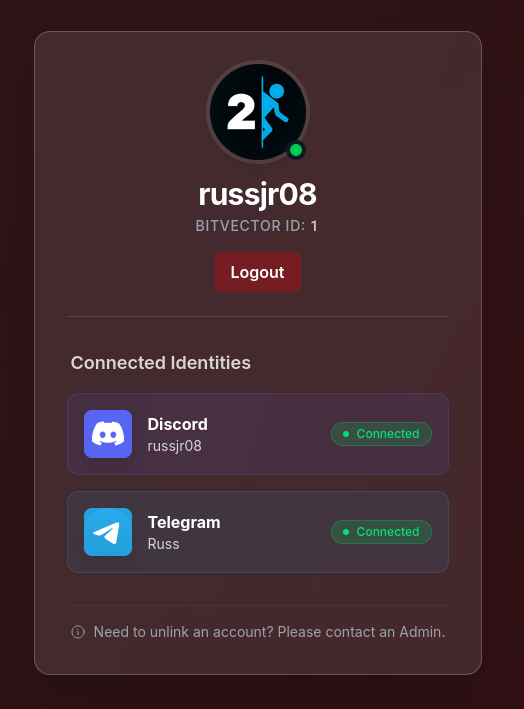
- You will end up at the account management portal, from there you will see any identities that you have currently linked to you.
- You can now safely click the "Connect" option next to another Identity Provider, such as Telegram.
- Once it shows "Connected", you can then use that identity to login in the future, or any other linked identities.
Heads up!
While you can connect multiple identity providers to your BitVector account, you can't have multiple identities linked from the same provider.
For example, you can't have two Discord accounts connected. If you have multiple Discord accounts, be sure you're logged into the right one!
If you need to change this, please reach out to an Admin. You'll need a second identity linked first though, as otherwise your account will become a ghost that no one can access! 👻
Started with a Telegram account, and wanting to use the Discord bot?
That's perfectly fine! However, its even more crucial that you follow the above instructions (but of course, start with logging via Telegram, and then "Connect" Discord).
Why? Because Vector, our Discord bot, if it does not recognize you then Vector will eagerly create an account for you. Just like the above note, then you'll have two BitVector accounts, and you'll need to reach out to an Admin to get this fixed - since you cannot link the same Graydient account to multiple BitVector accounts.
If you link your Discord account ahead of time though, then Vector will already know who you are, and even better - you'll be ready to go instantly!
Help! I think I accidentally have two accounts!
Don't panic! It happens, and we do expect it to occur every once in a while. It's impossible for us to make it impossible for you to run into that scenario, because we don't know "who" you are until you've registered - and of course by then it's too late. That being said, we can make it possible to recover from that, which is precisely what we've done.
How do I identify that this is what happened?
The tell-tale sign that you've run into this problem is that despite previously using BitVector (either through Discord, or through Spyglass on the web) you're being asked to link a Graydient account again, and then you try and it errors out claiming that the account is already linked. Or you might notice that your Render history is blank.
Looks like that has occurred, how do I fix this?
Terms we're using here
For the following section, we'll use the terms "old" account and "new" account. Just to clarify:
- "Old" in this case means the first account you created, and is the one you were previously using
- "New" is the second one that you accidentally created
You can of course reach out to an Admin and they can help correct this for you, however you can also fix this yourself - by deleting the new account. Now normally a BitVector account requires an Admin for it to be deleted, however you can perform a deletion yourself when these qualifications are met:
- You don't have a Graydient account linked
- You don't have any previous Jobs/Renders on your account
- Your account only has one identity connected to it
If you've accidentally created a second account, you'll pretty much always meet these qualifications. Here's what you'll need to do:
- You'll need to identify the "provider" that is the new one, that will be the latest one that you logged into (if our Discord bot is what you're trying to use and getting this error on, then that would always be Discord since you can't use Telegram through Discord 😅)
- Head over to the account portal
- It may ask you to login, click the "new" provider that you used to login with (or select Discord if you're using our Discord bot)
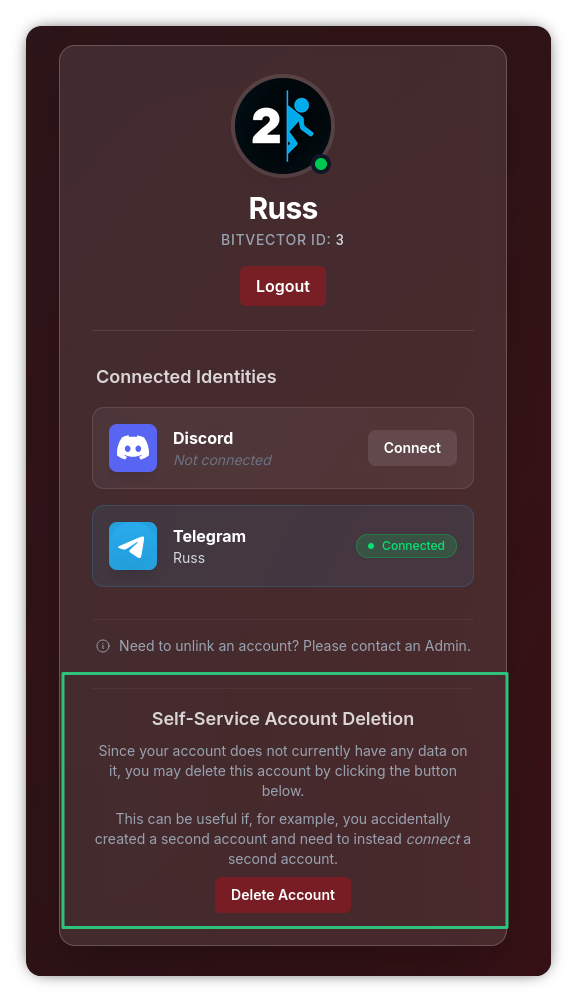
- You'll then see at the bottom of the screen an option to perform a self-service deletion (see the below screenshot for reference). Click this option, and confirm the deletion.
- It'll give some scary warnings, however the system is smart enough to not permit you to delete the account if it would actually result in any "real" data being deleted.
- Because of this, if you don't see the deletion option, that means you're probably on your "old" account. Click the logout button at the top of the page, then try to login again with the opposite provider.
- If you still don't see it (or if attempting to login to the opposite provider gives you the "This is a new account" notice) then please reach out to an Admin. This secret link will bring up a plain code-like page that will tell you exactly (of one of the previously mentioned reasons) why the system won't let you delete the account, listed as
ineligibility_reason.
- If you still don't see it (or if attempting to login to the opposite provider gives you the "This is a new account" notice) then please reach out to an Admin. This secret link will bring up a plain code-like page that will tell you exactly (of one of the previously mentioned reasons) why the system won't let you delete the account, listed as
- It'll process the deletion, then will instantly log you out and take you back to the login page.
- After that, you can connect your second identity provider if you'd like, by following the instructions in the above section. If you're just using Spyglass on the web, then that is not required and you can just continue using the original identity provider. If you're wanting to use our Discord bot however (and previously logged into Spyglass with a Telegram account) then you'll definitely want to use those above instructions to "Connect" Discord to your existing account.
(Self-Service Delete Example)