
Appearance
Welcome to BitVector!
This page will serve as a entrypoint into getting up and running with BitVector! Let's start by going over some quick requirements (we promise they're simple!):
Requirements
In order to start using BitVector, you'll need the following:
- A paid Graydient plan
- A Discord or Telegram account
- Some way to access Discord, if you plan on using Vector (our Discord bot)
- This can be either the Discord mobile apps, the desktop apps, or Discord's web client - any of those will work perfectly fine!
- A web browser, if you'd like to use Spyglass
- Usage of Spyglass isn't required, but its recommended to keep handy for some tasks that are difficult to build an experience in Discord - such as viewing the list of available models and workflows (we'll touch on that more later!)
- That's it! No, really - if you've got the above, you're all set!
BitVector Accounts
What is a BitVector account?
Regardless of the way you use BitVector's tools (via Vector on Discord, or via Spyglass), you're given a "BitVector Account" after logging in with one of the supported identity providers (when using via our Discord bot, this process is done automatically as you use the bot).
We don't make you create a username/email/password combination, because we'd rather not force you to have yet another account. Instead, you use an Identity Provider to prove who you are, which logs you into your BitVector account.
This distinction isn't super important, we're mainly listing it out for the sake of transparency!
TIP
Previously we only supported Discord as an Identity Provider (meaning you could only login via Discord), however now we also support Telegram too!
Since this is a very new feature, you may see some references to Discord accounts. You should be able to ues a Telegram accout in most places that a Discord account is referenced, we'll try to call out specifically the cases where you can't just yet.
Account Linking: BitVector <-> Graydient
Once you've met the requirements, the next thing you'll need before you can get started is getting your paid Graydient account linked to your Discord/BitVector account. We've got a couple of ways to do so:
Invite from Telegram (Recommended):
Note:
The "Linker" tool described below does not yet support logging in via Telegram. If you plan on logging in via Telegram, such as via Spyglass, please see the Spyglass-specific method described in the next section.
This is the easiest way to get linked! If you're already using the PirateDiffusion bot from Telegram, and you have a paid account activated/linked to your Telegram, simply DM PirateDiffusion and run the /discord command.
Doing so will grant you a link to our "Linker" invitation page and you'll be up and running in three simple steps!
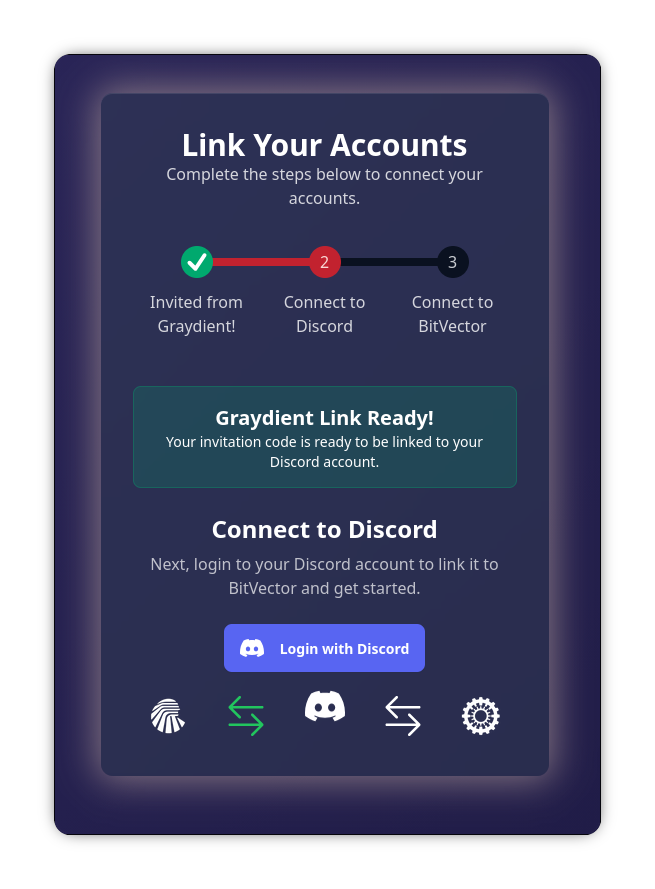
Plot twist! Opening the link is step one, so its really only two steps! Plot twist again - the third step is automatic, so really you only actually need to do one thing on that page! 😎
WARNING
Do not share that link with anyone! Treat it like a top secret password. Once a Graydient and BitVector account have been linked together, that Graydient account cannot be linked to another one unless it is unlinked. Unlinking an account requires Admin intervention!
And of course, account linking is against Terms of Service, you'd be responsible for all actions that person takes with your account, etc. It's a bad idea all around!
One-Time Passcode:
We also have a one-time passcode option, in which you enter in your Graydient account's email address, after doing so you'll receive a six digit code. Then you enter that code, and you're good to go!
Here's how to do this:
Link via Discord
To start this process from Discord, run the /graydient link command. A pop up will ask you for your email address, once you've entered it, click submit.
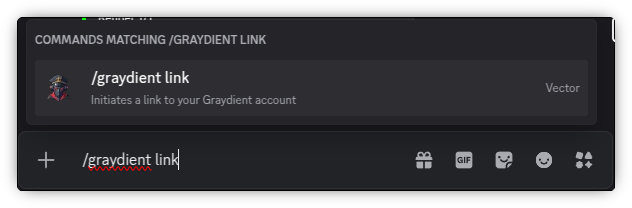
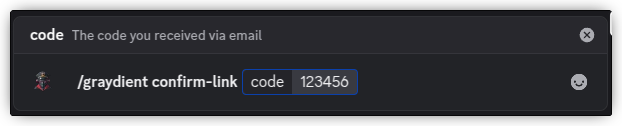
After you receive the six digit code, use the /graydient confirm-link command - the command itself will ask for the six digit code. You should receive a confirmation embed that shows you the plan that we detected from Graydient.
Link via Spyglass
After signing into Spyglass, if you do not have a Graydient account linked, a persistent red banner will appear at the top of every page with a link to start the process. It'll guide you from there, and will then confirm whether the account was linked successfully. The plan we detected from Graydient will appear at the top right under your profile picture.

WARNING
The same note about this being a semi-permanent action listed above in the Invite section applies here too. Once your Graydient account is linked and confirmed, you cannot unlink it (and thus cannot use it with another BitVector account) without Admin intervention!
Keep in mind, this isn't your Discord (and/or Telegram, if you're using that) account email that you're prompted for, but rather the email you used to sign up for your Graydient plan. It's totally okay if they're different! The email address on your Discord account has zero bearing here - in fact, we don't even see your Discord email address!
Privacy note
We do not store or log the email address that you enter in during the account linking process. After you enter it, the address is immediately discarded.
This One-Time Passcode option can be done in either Discord (via Vector) or on Spyglass. After you've finished linking your account, it is applied on both automatically.